/*
	Antenna House PDF Tool API V8.0
	C++ Interface sample program

	概要:テキスト検索してハイライト注釈

	Copyright 2018-2026 Antenna House, Inc.
*/

#include < PdfTk.h >
#include < stdio.h >

using namespace PdfTk;

int main(int argc, char* argv[])
{
	if (argc < 4) {
		printf("usage: SearchTextAndHighlightAuto.exe in-pdf-file out-pdf-file keyword\n");
		return 1;
	}
	try
	{
		PtlParamInput input(argv[1]);
		PtlParamOutput output(argv[2]);
		PtlParamString keyword(argv[3]);

		PtlPDFDocument doc;

		// PDFファイルをロードします。
		doc.load(input);

		// 検索の為のパラメータ
		PtlParamSearchTextAndHighlight paramSearchText;

		paramSearchText.appendText(keyword);
		paramSearchText.setTextType(PtlParamSearchTextAndHighlight::TEXT_RAW);
		PtlColorDeviceRGB color(1.0f, 0.0f, 0.0f);
		paramSearchText.setColor(color);
		paramSearchText.setOpacity(0.5f);

		// 検索実行
		doc.searchTextAndDoProcess(paramSearchText);

		// ファイルに保存します。
		doc.save(output);

		printf("完了!\n");
	}
	catch (const PtlException &e)
	{
		fprintf(stderr, "Error code : %d\n %s\n", e.getErrorCode(), e.getErrorMessage().c_str());
		return 1;
	}
	return 0;
}


PDF Tool APIサンプルコード:テキスト検索とハイライト注釈追加(注釈追加は関数による自動処理)
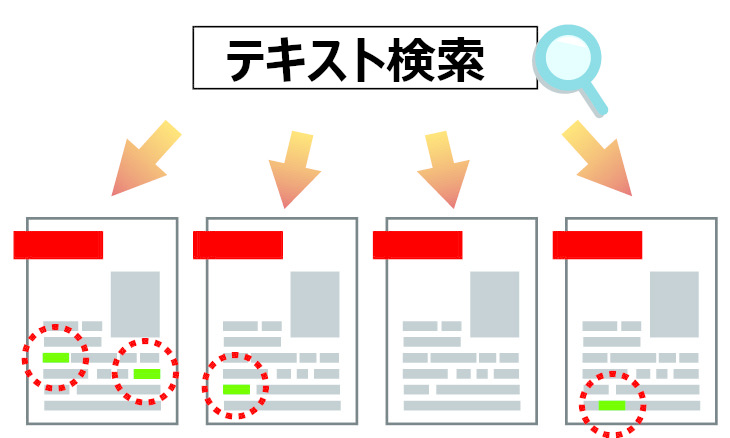
テキスト検索してハイライト注釈を追加します。(注釈追加は関数による自動処理)
概要
サンプルコードの概要
指定したテキストで検索し、ハイライト注釈を追加します。
このサンプルでは、関数による自動処理でハイライト注釈を追加しています。
座標を取得してハイライト注釈を追加することもできます。
- PtlParamSearchTextAndHighlight: テキスト検索してハイライト注釈をつけるパラメータを表現したクラス
- PtlParamSearchTextAndHighlight.appendText(): 検索するテキストを追加
- PtlPDFDocument.searchTextAndDoProcess(): テキスト検索して後処理
- PtlPage.searchTextAndDoProcess(): テキスト検索して後処理
サンプルコード
/*
    Antenna House PDF Tool API V8.0
    Java Interface sample program

    概要:テキスト検索してハイライト注釈

    Copyright 2018-2026 Antenna House, Inc.
*/

package Sample;

import jp.co.antenna.ptl.*;

public class SearchTextAndHighlightAuto {

    /**
     * @param args the command line arguments
     */
    public static void main(String[] args) {
        if (args.length < 3)
        {
            System.out.println("usage: java SearchTextAndHighlightAuto in-pdf-file out-pdf-file keyword");
            return;
        }

        try (PtlParamInput inputFile = new PtlParamInput(args[0]);
             PtlParamOutput outputFile = new PtlParamOutput(args[1]);
             PtlPDFDocument doc = new PtlPDFDocument())
        {
            // PDFファイルをロード
            doc.load(inputFile);

            try (PtlParamSearchTextAndHighlight paramSearchText = new PtlParamSearchTextAndHighlight();
                 PtlColorDeviceRGB color = new PtlColorDeviceRGB(1.0f, 0.0f, 0.0f))
            {
                // 検索設定
                paramSearchText.appendText(args[2]);
                paramSearchText.setColor(color);
                paramSearchText.setOpacity(0.5f);

                // 検索してハイライト注釈処理実行
                doc.searchTextAndDoProcess(paramSearchText);
            }

            // ファイルに保存します。
            doc.save(outputFile);
        }
        catch (PtlException pex) {
             System.out.println("PtlException : ErrorCode = " + pex.getErrorCode() + "\n  " + pex.getErrorMessage());
        }
        catch (Exception ex) {
            System.out.println(ex.getMessage());
            ex.printStackTrace();
        }
        catch (Error ex) {
            System.out.println(ex.getMessage());
            ex.printStackTrace();
        }
        finally {
            System.out.println("-- 完了 --");
        }
    }
}
/*
	Antenna House PDF Tool API V8.0
	.NET Interface sample program

	概要:テキスト検索してハイライト注釈

	Copyright 2018-2026 Antenna House, Inc.
*/

using System;
using PdfTkNet;

namespace SearchTextAndHighlightAuto
{
    class Program
    {
        static void Main(string[] args)
        {
            if (args.Length < 3)
            {
                Console.WriteLine("usage: SearchTextAndHighlightAuto.exe in-pdf-file out-pdf-file keyword");
                return;
            }

            try
            {
                using (PtlParamInput inputFile = new PtlParamInput(args[0]))
                using (PtlParamOutput outputFile = new PtlParamOutput(args[1]))
                using (PtlPDFDocument doc = new PtlPDFDocument())
                {
                    // PDFファイルをロードします。
                    doc.load(inputFile);

                    using (PtlParamSearchTextAndHighlight paramSearchText = new PtlParamSearchTextAndHighlight())  // 検索の為のパラメータ
                    using (PtlColorDeviceRGB color = new PtlColorDeviceRGB(1.0f, 0.0f, 0.0f))
                    {
                        // 検索設定
                        paramSearchText.appendText(args[2]);
                        paramSearchText.setColor(color);
                        paramSearchText.setOpacity(0.5f);

                        // 検索実行
                        doc.searchTextAndDoProcess(paramSearchText);
                    }

                    // ファイルに保存します。
                    doc.save(outputFile);
                }
            }
            catch (PtlException pex)
            {
                Console.WriteLine(pex.getErrorCode() + " : " + pex.getErrorMessageJP());
                pex.Dispose();
            }
            catch (Exception ex)
            {
                Console.WriteLine(ex.Message);
            }
            finally
            {
                Console.WriteLine("-- 完了 --");
            }
        }
    }
}
実行例
コマンドラインでの実行例
SearchTextAndHighlightAuto.exe C:\in\gon.pdf C:\sav\outSearchTextAndHighlightAuto.pdf "「ごん、お前《まい》だったのか。いつも栗をくれたのは」"
完了!
java -jar SearchTextAndHighlightAuto.jar C:\in\gon.pdf C:\sav\outSearchTextAndHighlightAuto.pdf "「ごん、お前《まい》だったのか。いつも栗をくれたのは」"
-- 完了 --
SearchTextAndHighlightAuto.exe C:\in\gon.pdf C:\sav\outSearchTextAndHighlightAuto.pdf "「ごん、お前《まい》だったのか。いつも栗をくれたのは」"
-- 完了 --
出力結果イメージ
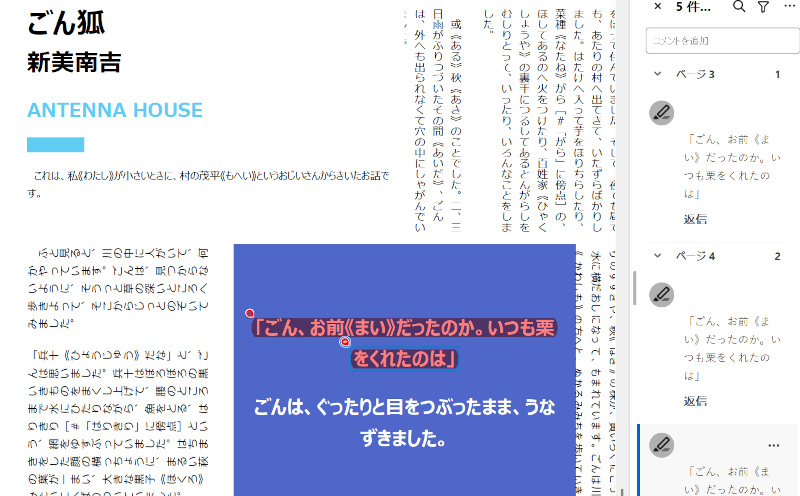
このサンプルでは検索結果のテキストにハイライト注釈を追加します。
出力されたPDFでは"「ごん、お前《まい》だったのか。いつも栗をくれたのは」"の箇所にハイライト注釈が表示されます。