/*
	Antenna House PDF Tool API V8.0
	C++ Interface sample program

	概要:テキストエレメント情報取得の例

	Copyright 2025- Antenna House, Inc.
*/

#include < PdfTk.h >
#include < stdio.h >
#include < string >

using namespace std;
using namespace PdfTk;

static void addStamp(PtlPage& page);
static void addAnnot(PtlPage& page);
static void addOutline(PtlPage& page, PtlOutline& outlineRoot, int pg);
static string writeColor(PtlColor* clr);

int main(int argc, char* argv[])
{
	if (argc < 3) {
		printf("usage: EditElement.exe in-pdf-file out-pdf-file\n");
		return 1;
	}

	try
	{
		PtlParamInput input(argv[1]);
		PtlParamOutput output(argv[2]);

		PtlPDFDocument doc;

		// PDFファイルをロードします。
		doc.load(input);

        // ページコンテナの取得
		PtlPages& pages = doc.getPages();

		if (pages.isEmpty()){
			printf("ページコンテナが空\n");
			return 1;
		}

        int pageCount = pages.getCount();
        if (pageCount >= 1)
        {
            PtlPage page1 = pages.get(0);	//1ページ目
            //「ごん狐」の箇所にスタンプを置く例
            addStamp(page1);
        }

        if (pageCount >= 2)
        {
            PtlPage page2 = pages.get(1);	//2ページ目
            //「兵十」に注釈を置く例
            addAnnot(page2);
        }

        if (pageCount >= 3)
        {
            PtlPage page3 = pages.get(2);	//3ページ目
            // 文字列を元にしおりを作成する例
            PtlOutline outlineRoot = doc.getRootOutline();
            addOutline(page3, outlineRoot, 2);
        }

        doc.save(output);

		printf("完了!\n");
	}
	catch (const PtlException &e)
	{
		fprintf(stderr, "Error code : %d\n %s\n", e.getErrorCode(), e.getErrorMessage().c_str());
		return 1;
	}
	return 0;
}

static void addStamp(PtlPage& page)
{
    // 「ごん狐」の箇所にスタンプを置く例
    PtlContent content = page.getContent();
    PtlEditElements elements = content.getEditElements();
    int elemCnt = elements.getCount();
    for (int i = 0; i < elemCnt; ++i)
    {
        PtlEditElement& element = elements.get(i);
        if (element.getType() == PtlEditElement::ELEMENT_TYPE::TYPE_TEXT)
        {
            PtlEditText* textObj = dynamic_cast< PtlEditText* >(&element);
            // dynamic_cast の結果を必ずチェック
            if (textObj == nullptr) {
                printf("addStamp: textObj == nullptr, skip\n");
                continue;
            }
            PtlEditTextItems items = textObj->getTextItems();
            int itemCnt = items.getCount();
            for (int j = 0; j < itemCnt; ++j)
            {
                PtlEditTextItem item = items.get(j);
                // "ごん狐"の位置にスタンプを追加する
                if (std::string(item.getText().c_str()) == "ごん狐")
                {
                    PtlAnnots annots = page.getAnnots();
                    PtlAnnotStamp* stampAnnot1 = new PtlAnnotStamp();
                    PtlRect recB = item.getBBox();
                    stampAnnot1->setRect(recB);
                    stampAnnot1->setIconType(PtlAnnotStamp::ICON_TYPE::ICON_APPROVED);
                    stampAnnot1->setAnnotFlags(PtlAnnot::ANNOT_FLAGS::FLAG_PRINT);
                    annots.append(*stampAnnot1);
                    delete stampAnnot1;
                }
            }
        }
    }
}

static void addAnnot(PtlPage& page)
{
    // 「兵十」に注釈を置く例
    PtlContent content = page.getContent();
    PtlEditElements elements = content.getEditElements();
    int elemCnt = elements.getCount();
    for (int i = 0; i < elemCnt; ++i)
    {
        // 参照で受け取ってスライスを防止
        PtlEditElement& element = elements.get(i);
        if (element.getType() == PtlEditElement::ELEMENT_TYPE::TYPE_TEXT)
        {
            PtlEditText* textObj = dynamic_cast< PtlEditText* >(&element);
            // dynamic_cast の結果を必ずチェック
            if (textObj == nullptr) {
                printf("addAnnot: textObj == nullptr, skip\n");
                continue;
            }
            PtlEditTextItems items = textObj->getTextItems();
            int itemCnt = items.getCount();
            for (int j = 0; j < itemCnt; ++j)
            {
                PtlEditTextItem item = items.get(j);
                if (std::string(item.getText().c_str()) == "兵十")
                {
                    PtlAnnots annots = page.getAnnots();
                    PtlAnnotText* annottext = new PtlAnnotText();
                    annottext->setIconType(PtlAnnotText::ICON_TYPE::ICON_COMMENT);
                    annottext->setRect(item.getBBox());

                    PtlRect recB = item.getBBox();
                    string str = "Rect (" + to_string(recB.getLeft()) + ", " + to_string(recB.getBottom()) + ", " + to_string(recB.getRight()) + ", " + to_string(recB.getTop()) + ")\n";

                    PtlQuadPoint qpoint = item.getQuadPoint();
                    str += "QuadPoint : TopLeft (" + to_string(qpoint.getTopLeft().getX()) + ", " + to_string(qpoint.getTopLeft().getY()) + ")\n";
                    str += "QuadPoint : TopRight (" + to_string(qpoint.getTopRight().getX()) + ", " + to_string(qpoint.getTopRight().getY()) + ")\n";
                    str += "QuadPoint : BottomLeft (" + to_string(qpoint.getBottomLeft().getX()) + ", " + to_string(qpoint.getBottomLeft().getY()) + ")\n";
                    str += "QuadPoint : BottomRight (" + to_string(qpoint.getBottomRight().getX()) + ", " + to_string(qpoint.getBottomRight().getY()) + ")\n";
                    PtlFontInfo fontInfo = item.getFontInfo();
                    str += "FontName : ";
                    str += fontInfo.getFontName().c_str();
                    str += "\n";
                    str += fontInfo.isEmbedded() ? "isEmbedded : true\n" : "isEmbedded : false\n";

                    str += "ペイントフラグ:\n";
                    if (static_cast< PtlEditTextItem::PAINT_FLAGS >(item.getPaintFlags()) & PtlEditTextItem::PAINT_FLAGS::PAINT_FILL)
                    {
                        PtlColor clr = item.getFillColor();
                        str += " PAINT_FILL" + writeColor(&clr) + "\n";
                    }
                    if (static_cast< PtlEditTextItem::PAINT_FLAGS >(item.getPaintFlags()) & PtlEditTextItem::PAINT_FLAGS::PAINT_STROKE)
                    {
                        PtlColor clr = item.getStrokeColor();
                        str += " PAINT_STROKE" + writeColor(&clr) + "\n";
                    }

                    annottext->setTextContents(PtlParamString(str.c_str()));

                    time_t t = time(nullptr);
                    tm now;
                    localtime_s(&now, &t);
                    PtlDate* date = new PtlDate(now.tm_year + 1900, now.tm_mon + 1, now.tm_mday, now.tm_hour, now.tm_min, now.tm_sec);
                    annottext->setDate(*date);
                    delete date;

                    annottext->setAnnotFlags(PtlAnnotText::ANNOT_FLAGS::FLAG_NOROTATE);

                    PtlColor fillColor = item.getFillColor();
                    if (fillColor.getType() == PtlColor::COLOR_TYPE::TYPE_DEVICE_RGB)
                    {
                        PtlColorDeviceRGB* color = static_cast< PtlColorDeviceRGB*>(&fillColor);
                        if (color != nullptr)
                        {
                            annottext->setColor(*color);
                        }
                    }

                    annottext->setBorderStyle(PtlAnnotText::BORDER_STYLE::BORDER_SOLID);
                    annottext->setBorderWidth(PtlAnnotText::BORDER_LINE_WIDTH::BORDER_WIDTH_THIN);

                    annottext->setMarkUpTitle(item.getText());
                    annottext->setMarkUpSubj(PtlParamString(to_string(item.getPaintFlags()).c_str()));

                    date = new PtlDate(now.tm_year + 1900, now.tm_mon + 1, now.tm_mday, now.tm_hour, now.tm_min, now.tm_sec);
                    annottext->setMarkUpDate(*date);
                    delete date;

                    annottext->setMarkUpCA(0.6f);

                    annots.append(*annottext);
                    delete annottext;
                }
            }
        }
    }
}

static void addOutline(PtlPage& page, PtlOutline& outlineRoot, int pg)
{
    // 赤と青の文字列を元にしおりを作成する例
    PtlContent content = page.getContent();
    PtlEditElements elements = content.getEditElements();
    int elemCnt = elements.getCount();
    for (int i = 0; i < elemCnt; ++i)
    {
        PtlEditElement& element = elements.get(i);
        if (element.getType() == PtlEditElement::ELEMENT_TYPE::TYPE_TEXT)
        {
            PtlEditText* textObj = dynamic_cast< PtlEditText*>(&element);
            if (textObj == nullptr) continue;
            PtlEditTextItems items = textObj->getTextItems();
            int itemCnt = items.getCount();
            for (int j = 0; j < itemCnt; ++j)
            {
                PtlEditTextItem item = items.get(j);
                PtlColor fillColorBase = item.getFillColor();
                if (fillColorBase.getType() == PtlColor::COLOR_TYPE::TYPE_DEVICE_RGB)
                {
                    PtlColorDeviceRGB* color = static_cast< PtlColorDeviceRGB* >(&fillColorBase);
                    if (color != nullptr)
                    {
                        // outline をここで定義
                        PtlOutline* outline = new PtlOutline();

                        // テキストの塗りつぶし色が青か赤のとき
                        if ((color->getR() == 0.0f && color->getG() == 0.0f && color->getB() == 1.0f)
                            || (color->getR() == 1.0f && color->getG() == 0.0f && color->getB() == 0.0f))
                        {
                            outline->setColor(*color);
                            outline->setTitle(item.getText());

                            PtlActionGoTo* actiongoto = new PtlActionGoTo();
                            PtlDestXYZ* destxyz = new PtlDestXYZ();
                            destxyz->setPageNumber(pg);
                            PtlRect recB = item.getBBox();
                            destxyz->setBottom(recB.getBottom());
                            destxyz->setTop(recB.getTop());
                            destxyz->setLeft(recB.getLeft());
                            destxyz->setRight(recB.getRight());
                            actiongoto->setDest(*destxyz);
                            outline->setAction(*actiongoto);

                            outline->setFlags(PtlOutline::ITEM_FLAG::FLAG_NORMAL);
                            outline->setOpen(true);

                            outlineRoot.appendLastChild(*outline);

                            delete actiongoto;
                            delete destxyz;
                            delete outline;
                        }
                    }
                }
            }
        }
    }
}

static string writeColor(PtlColor* clr)
{
    string str;
    switch (clr->getType())
    {
    case PtlColor::COLOR_TYPE::TYPE_DEVICE_RGB:
    {
        PtlColorDeviceRGB* rgbColor = static_cast< PtlColorDeviceRGB* >(clr);
        str = " : DEVICE_RGB  : (" + to_string(rgbColor->getR()) + ", " + to_string(rgbColor->getG()) + ", " + to_string(rgbColor->getB()) + ")";
        break;
    }
    case PtlColor::COLOR_TYPE::TYPE_DEVICE_CMYK:
    {
        PtlColorDeviceCMYK* cmykColor = static_cast< PtlColorDeviceCMYK* >(clr);
        str = " : DEVICE_CMYK (" + to_string(cmykColor->getC()) + ", " + to_string(cmykColor->getM()) + ", " + to_string(cmykColor->getY()) + ", " + to_string(cmykColor->getK()) + ")";
        break;
    }
    case PtlColor::COLOR_TYPE::TYPE_DEVICE_GRAY:
    {
        PtlColorDeviceGray* gryColor = static_cast< PtlColorDeviceGray* >(clr);
        str = " : DEVICE_GRAY (" + to_string(gryColor->getGray()) + ")";
        break;
    }
    case PtlColor::COLOR_TYPE::TYPE_NONE:
        str = " : COLOR_TYPE.TYPE_NONE";
        break;
    case PtlColor::COLOR_TYPE::TYPE_UNKNOWN:
        str = " : COLOR_TYPE.TYPE_UNKNOWN";
        break;
    }
    return str;
}

PDF Tool APIサンプルコード:テキストエレメント情報取得
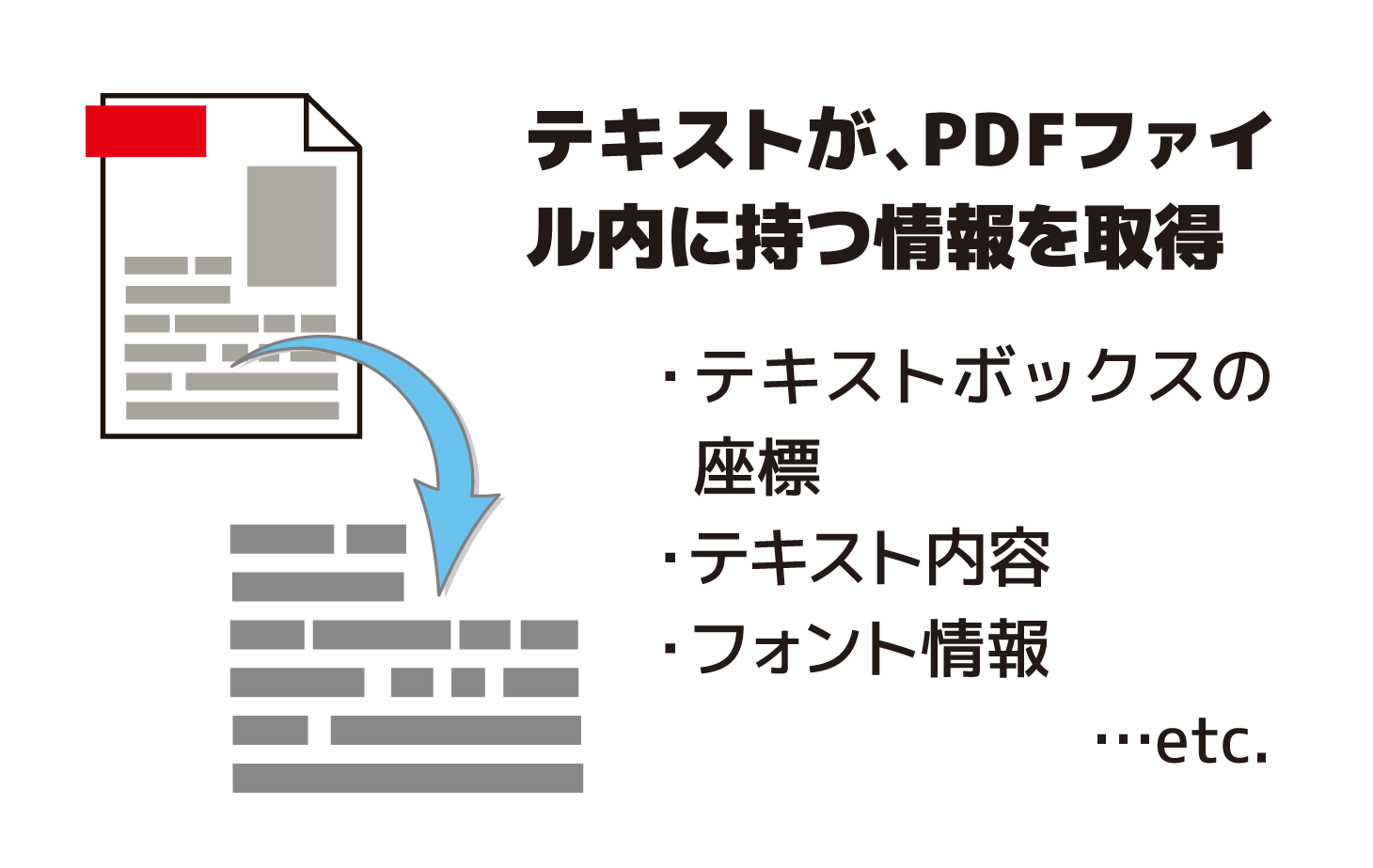
テキストエレメント情報を取得してさまざまに利用します。
概要
サンプルコードの概要
各ページのコンテンツからテキストエレメントの情報を取得して利用します。
1ページ目は指定したテキストの位置にスタンプを追加します。
2ページ目は指定したテキストの位置にエレメントの情報を記入した注釈を追加します。
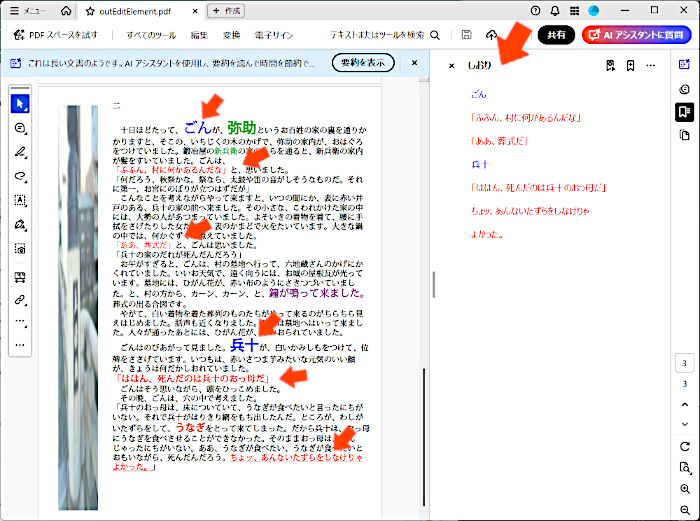
3ページ目は指定したテキストの位置へのブックマークを追加します。
- PtlContent: ページに描画される内容(コンテント)を表現するクラス
- PtlPage.getContent(): ページコンテントを取得
- PtlEditElements: EditElementのコンテナを表現するクラス
- PtlContent.getEditElements(): EditElementコンテナを取得
- PtlEditElements.getCount(): EditElement数を取得
- PtlEditElement: コンテントに描画されるエレメントを表現したクラス
- PtlEditElements.get(): 指定した番号のEditElementを取得
- PtlEditTextItems: テキストアイテムのコンテナを表現するクラス
- PtlEditText.getTextItems(): テキストアイテムコンテナを取得
- PtlEditTextItem: テキストアイテムを表現したクラス
- PtlEditText.get(): テキストアイテムを取得
サンプルコード
/*
Antenna House PDF Tool API V8.0
Java Interface sample program
概要:テキストエレメント情報取得の例
Copyright 2025- Antenna House, Inc.
*/ /* ーーーー */
package Sample;
import java.time.LocalDateTime;
import jp.co.antenna.ptl.*;
public class EditElement {
/**
* @param args the command line arguments
*/
public static void main(String[] args) {
if (args.length < 2)
{
System.out.println("usage: java EditElement in-pdf-file out-pdf-file");
return;
}
try (PtlParamInput inputFile = new PtlParamInput(args[0]);
PtlParamOutput output = new PtlParamOutput(args[1]);
PtlPDFDocument doc = new PtlPDFDocument())
{
// PDFファイルをロードします。
doc.load(inputFile);
try (PtlPages pages = doc.getPages()) // ページコンテナの取得
{
// ページコンテナが空かどうか
if (pages.isEmpty())
{
System.out.println("ページコンテナが空");
return;
}
int pageCount = pages.getCount();
if (pageCount >= 1)
{
try (PtlPage page = pages.get(0)) //1ページ目
{
//「ごん狐」の箇所にスタンプを置く例
addStamp(page);
}
}
if (pageCount >= 2)
{
//「兵十」に注釈を置く例
try (PtlPage page = pages.get(1)) //2ページ目
{
addAnnot(page);
}
}
if (pageCount >= 3)
{
//文字列を元にしおりを作成する例
int pg = 2;
try (PtlPage page = pages.get(pg); //3ページ目
PtlOutline outlineRoot = doc.getRootOutline();)
{
addOutline(page, outlineRoot, pg);
}
}
}
doc.save(output);
}
catch (PtlException pex) {
System.out.println("PtlException : ErrorCode = " + pex.getErrorCode() + "\n " + pex.getErrorMessage());
}
catch (Exception ex) {
System.out.println(ex.getMessage());
ex.printStackTrace();
}
catch (Error ex) {
System.out.println(ex.getMessage());
ex.printStackTrace();
}
finally {
System.out.println("-- 完了 --");
}
}
public static void addStamp(PtlPage page) throws PtlException, Exception, Error
{
//「ごん狐」の箇所にスタンプを置く例
try (PtlContent content = page.getContent();
PtlEditElements elements = content.getEditElements();)
{
int elemCnt = elements.getCount();
for (int i = 0; i < elemCnt; i++)
{
PtlEditElement element = elements.get(i);
// テキストエレメント
if (element.getType() == PtlEditElement.ELEMENT_TYPE.TYPE_TEXT)
{
PtlEditText textObj = (PtlEditText)element;
PtlEditTextItems items = textObj.getTextItems();
int itemCnt = items.getCount();
for (int j = 0; j < itemCnt; j++)
{
PtlEditTextItem item = items.get(j);
PtlFontInfo fontInfo = item.getFontInfo();
// "ごん狐"の位置にスタンプを追加する
if (item.getText().equals("ごん狐"))
{
try (PtlAnnots annots = page.getAnnots();
PtlAnnotStamp stampAnnot1 = new PtlAnnotStamp();)
{
// テキストの位置を取得
PtlRect recB = item.getBBox();
stampAnnot1.setRect(recB);
stampAnnot1.setIconType(PtlAnnotStamp.ICON_TYPE.ICON_APPROVED);
stampAnnot1.setAnnotFlags(PtlAnnot.FLAG_PRINT);
annots.append(stampAnnot1);
}
}
}
}
}
}
}
public static void addAnnot(PtlPage page) throws PtlException, Exception, Error
{
//「兵十」に注釈を置く例
try (PtlContent content = page.getContent();
PtlEditElements elements = content.getEditElements();)
{
int elemCnt = elements.getCount();
for (int i = 0; i < elemCnt; i++)
{
PtlEditElement element = elements.get(i);
// テキストエレメント
if (element.getType() == PtlEditElement.ELEMENT_TYPE.TYPE_TEXT)
{
PtlEditText textObj = (PtlEditText)element;
PtlEditTextItems items = textObj.getTextItems();
int itemCnt = items.getCount();
for (int j = 0; j < itemCnt; j++)
{
PtlEditTextItem item = items.get(j);
//注釈を追加する例
if (item.getText().equals("兵十"))
{
//注釈コンテナの取得
try (PtlAnnots annots = page.getAnnots();)
{
//PDFのテキスト注釈
try (PtlAnnotText annottext = new PtlAnnotText();)
{
//アイコンタイプ設定 ICON_COMMENT = 1, /* コメント */
annottext.setIconType(PtlAnnotText.ICON_TYPE.ICON_COMMENT);
//矩形座標にテキストの位置を設定
annottext.setRect(item.getBBox());
// テキストの位置を取得
PtlRect recB = item.getBBox();
String str = "Rect (" + recB.getLeft() + ", " + recB.getBottom() + ", " + recB.getRight() + ", " + recB.getTop() + ")" + "\n";
PtlQuadPoint qpoint = item.getQuadPoint();
str += "QuadPoint : TopLeft (" + qpoint.getTopLeft().getX() + ", " + qpoint.getTopLeft().getY() + ")" + "\n";
str += "QuadPoint : TopRight (" + qpoint.getTopRight().getX() + ", " + qpoint.getTopRight().getY() + ")" + "\n";
str += "QuadPoint : BottomLeft (" + qpoint.getBottomLeft().getX() + ", " + qpoint.getBottomLeft().getY() + ")" + "\n";
str += "QuadPoint : BottomRight (" + qpoint.getBottomRight().getX() + ", " + qpoint.getBottomRight().getY() + ")" + "\n";
// フォント情報を取得
PtlFontInfo fontInfo = item.getFontInfo();
str += "FontName : " + fontInfo.getFontName() + "\n";
if (fontInfo.isEmbedded())
{ // 文字の埋め込みを取得
str += "isEmbedded : true" + "\n";
}
else
{
str += "isEmbedded :false" + "\n";
}
// ペイントフラグ
str += "ペイントフラグ:" + "\n";
switch(item.getPaintFlags())
{
case (int)PtlEditTextItem.PAINT_FILL:
//塗りつぶしの色
PtlColor clr1 = item.getFillColor();
str += " PAINT_FILL" + writeColor(clr1) + "\n";
break;
case (int)PtlEditTextItem.PAINT_STROKE:
//輪郭色
PtlColor clr2 = item.getStrokeColor();
str += " PAINT_STROKE" + writeColor(clr2) + "\n";
break;
}
//内容をを設定
annottext.setTextContents(str);
//日時の設定
//DateTime dt = DateTime.Now;
LocalDateTime dt = LocalDateTime.now();
try (PtlDate date = new PtlDate(dt.getYear(), dt.getMonthValue(), dt.getDayOfMonth(), dt.getHour(), dt.getMinute(), dt.getSecond());)
{
annottext.setDate(date);
}
//注釈フラグを設定
annottext.setAnnotFlags(PtlAnnotText.FLAG_NOROTATE);
//色を設定
if (item.getFillColor().getType() == PtlColor.COLOR_TYPE.TYPE_DEVICE_RGB)
{
try (PtlColorDeviceRGB color = (PtlColorDeviceRGB)item.getFillColor();)
{
annottext.setColor(color);
}
}
//境界線スタイルを設定
annottext.setBorderStyle(PtlAnnotText.BORDER_STYLE.BORDER_SOLID);
//境界線幅を設定
annottext.setBorderWidth(PtlAnnotText.BORDER_LINE_WIDTH.BORDER_WIDTH_THIN);
//------
//ポップアップウィンドウのタイトル文字列設定
annottext.setMarkUpTitle(item.getText());
//サブジェクトの短い説明設定
annottext.setMarkUpSubj(Integer.toString(item.getPaintFlags()));
//注釈生成日時の設定
try (PtlDate dateMarkup = new PtlDate(dt.getYear(), dt.getMonthValue(), dt.getDayOfMonth(), dt.getHour(), dt.getMinute(), dt.getSecond());)
{
annottext.setMarkUpDate(dateMarkup);
}
//不透明度を設定
annottext.setMarkUpCA(0.6f);
//注釈の追加
annots.append(annottext);
}
}
}
}
}
}
}
}
public static void addOutline(PtlPage page, PtlOutline outlineRoot, int pg) throws PtlException, Exception, Error
{
//赤と青の文字列を元にしおりを作成する例
try (PtlContent content = page.getContent();
PtlEditElements elements = content.getEditElements();)
{
int elemCnt = elements.getCount();
for (int i = 0; i < elemCnt; i++)
{
PtlEditElement element = elements.get(i);
// テキストエレメント
if (element.getType() == PtlEditElement.ELEMENT_TYPE.TYPE_TEXT)
{
PtlEditText textObj = (PtlEditText)element;
PtlEditTextItems items = textObj.getTextItems();
int itemCnt = items.getCount();
for (int j = 0; j < itemCnt; j++)
{
PtlEditTextItem item = items.get(j);
if (item.getFillColor().getType() == PtlColor.COLOR_TYPE.TYPE_DEVICE_RGB)
{
try (PtlOutline outline = new PtlOutline();
PtlColorDeviceRGB color = (PtlColorDeviceRGB)item.getFillColor();)
{
// テキストの塗りつぶし色が青か赤のとき
if ((color.getR() == 0.0f && color.getG() == 0.0f && color.getB() == 1.0f)
|| (color.getR() == 1.0f && color.getG() == 0.0f && color.getB() == 0.0f))
{
// アウトラインタイトルの色にテキストの塗りつぶし色を設定
outline.setColor(color);
// テキストエレメントの内容をアウトラインに設定
outline.setTitle(item.getText());
// PtlActionGoTo : GoToアクション<現在のドキュメント内の宛先へ移動>
try (PtlActionGoTo actiongoto = new PtlActionGoTo();
// PtlDestXYZ 宛先にテキストエレメントの位置を設定
PtlDestXYZ destxyz = new PtlDestXYZ();)
{
destxyz.setPageNumber(pg); //ページ指定
PtlRect recB = item.getBBox(); // テキストの位置
destxyz.setBottom(recB.getBottom());
destxyz.setTop(recB.getTop());
destxyz.setLeft(recB.getLeft());
destxyz.setRight(recB.getRight());
// 宛先の設定
actiongoto.setDest(destxyz);
// アクションの設定
outline.setAction(actiongoto);
}
// アウトラインフラグを設定
outline.setFlags(PtlOutline.FLAG_NORMAL);
// PDF表示時の子アウトラインをオープンするかどうかの設定
outline.setOpen(true);
// 子アウトラインの追加
outlineRoot.appendLastChild(outline);
}
}
}
}
}
}
}
}
public static String writeColor(PtlColor clr) throws PtlException, Exception, Error
{
// 色の文字列を取得
String str = "";
switch (clr.getType())
{
case TYPE_DEVICE_RGB:
str += " : DEVICE_RGB : ";
PtlColorDeviceRGB rgbColor = (PtlColorDeviceRGB)clr;
str += "(" + rgbColor.getR() + ", " + rgbColor.getG() + ", " + rgbColor.getB() + ")";
break;
case TYPE_DEVICE_CMYK:
str += " : DEVICE_CMYK";
PtlColorDeviceCMYK cmykColor = (PtlColorDeviceCMYK)clr;
str += "(" + cmykColor.getC() + ", " + cmykColor.getM() + ", " + cmykColor.getY() + ", " + cmykColor.getK() + ")";
break;
case TYPE_DEVICE_GRAY:
str += " : DEVICE_GRAY";
PtlColorDeviceGray gryColor = (PtlColorDeviceGray)clr;
str += "(" + gryColor.getGray() + ")";
break;
case TYPE_NONE:
str += " : COLOR_TYPE.TYPE_NONE";
break;
case TYPE_UNKNOWN:
str += " : COLOR_TYPE.TYPE_UNKNOWN";
break;
}
return str;
}
}
/*
Antenna House PDF Tool API V8.0
.NET Interface sample program
概要:テキストエレメント情報取得の例
Copyright 2025- Antenna House, Inc.
*/
using System;
using PdfTkNet;
namespace EditElement
{
class Program
{
static void Main(string[] args)
{
if (args.Length < 2)
{
Console.WriteLine("usage: EditElement.exe in-pdf-file out-pdf-file\n");
return;
}
try
{
using (PtlParamInput inputFile = new PtlParamInput(args[0]))
using (PtlParamOutput output = new PtlParamOutput(args[1]))
using (PtlPDFDocument doc = new PtlPDFDocument())
{
// PDFファイルをロードします。
doc.load(inputFile);
using (PtlPages pages = doc.getPages())
{
//ページコンテナが空かどうか
if (pages.isEmpty())
{
Console.WriteLine("ページコンテナが空");
return;
}
int pageCount = pages.getCount();
if (pageCount >= 1)
{
using (PtlPage page = pages.get(0)) //1ページ目
{
//「ごん狐」の箇所にスタンプを置く例
addStamp(page);
}
}
if (pageCount >= 2)
{
//「兵十」に注釈を置く例
using (PtlPage page = pages.get(1)) //2ページ目
{
addAnnot(page);
}
}
if (pageCount >= 3)
{
//文字列を元にしおりを作成する例
int pg = 2;
using (PtlPage page = pages.get(pg)) //3ページ目
using (PtlOutline outlineRoot = doc.getRootOutline())
{
addOutline(page, outlineRoot, pg);
}
}
}
doc.save(output);
}
}
catch (PtlException pex)
{
Console.WriteLine(pex.getErrorCode() + " : " + pex.getErrorMessageJP());
}
catch (Exception ex)
{
Console.WriteLine(ex.Message);
}
finally
{
Console.WriteLine("-- 完了 --");
}
}
static void addStamp(PtlPage page)
{
//「ごん狐」の箇所にスタンプを置く例
using (PtlContent content = page.getContent())
using (PtlEditElements elements = content.getEditElements())
{
int elemCnt = elements.getCount();
for (int i = 0; i < elemCnt; i++)
{
PtlEditElement element = elements.get(i);
// テキストエレメント
if (element.getType() == PtlEditElement.ELEMENT_TYPE.TYPE_TEXT)
{
PtlEditText textObj = (PtlEditText)element;
PtlEditTextItems items = textObj.getTextItems();
int itemCnt = items.getCount();
for (int j = 0; j < itemCnt; j++)
{
PtlEditTextItem item = items.get(j);
PtlFontInfo fontInfo = item.getFontInfo();
// "ごん狐"の位置にスタンプを追加する
if (item.getText().Equals("ごん狐"))
{
using (PtlAnnots annots = page.getAnnots())
using (PtlAnnotStamp stampAnnot1 = new PtlAnnotStamp())
{
// テキストの位置を取得
PtlRect recB = item.getBBox();
stampAnnot1.setRect(recB);
stampAnnot1.setIconType(PtlAnnotStamp.ICON_TYPE.ICON_APPROVED);
stampAnnot1.setAnnotFlags(PtlAnnot.ANNOT_FLAGS.FLAG_PRINT);
annots.append(stampAnnot1);
}
}
}
}
}
}
}
static void addAnnot(PtlPage page)
{
//「兵十」に注釈を置く例
using (PtlContent content = page.getContent())
using (PtlEditElements elements = content.getEditElements())
{
int elemCnt = elements.getCount();
for (int i = 0; i < elemCnt; i++)
{
PtlEditElement element = elements.get(i);
// テキストエレメント
if (element.getType() == PtlEditElement.ELEMENT_TYPE.TYPE_TEXT)
{
PtlEditText textObj = (PtlEditText)element;
PtlEditTextItems items = textObj.getTextItems();
int itemCnt = items.getCount();
for (int j = 0; j < itemCnt; j++)
{
PtlEditTextItem item = items.get(j);
//注釈を追加する例
if (item.getText().Equals("兵十"))
{
//注釈コンテナの取得
using (PtlAnnots annots = page.getAnnots())
{
//PDFのテキスト注釈
using (PtlAnnotText annottext = new PtlAnnotText())
{
//アイコンタイプ設定 ICON_COMMENT = 1, /* コメント */
annottext.setIconType(PtlAnnotText.ICON_TYPE.ICON_COMMENT);
//矩形座標にテキストの位置を設定
annottext.setRect(item.getBBox());
// テキストの位置を取得
PtlRect recB = item.getBBox();
string str = "Rect (" + recB.getLeft() + ", " + recB.getBottom() + ", " + recB.getRight() + ", " + recB.getTop() + ")" + Environment.NewLine;
PtlQuadPoint qpoint = item.getQuadPoint();
str += "QuadPoint : TopLeft (" + qpoint.getTopLeft().getX() + ", " + qpoint.getTopLeft().getY() + ")" + Environment.NewLine;
str += "QuadPoint : TopRight (" + qpoint.getTopRight().getX() + ", " + qpoint.getTopRight().getY() + ")" + Environment.NewLine;
str += "QuadPoint : BottomLeft (" + qpoint.getBottomLeft().getX() + ", " + qpoint.getBottomLeft().getY() + ")" + Environment.NewLine;
str += "QuadPoint : BottomRight (" + qpoint.getBottomRight().getX() + ", " + qpoint.getBottomRight().getY() + ")" + Environment.NewLine;
// フォント情報を取得
PtlFontInfo fontInfo = item.getFontInfo();
str += "FontName : " + fontInfo.getFontName() + Environment.NewLine;
if (fontInfo.isEmbedded())
{ // 文字の埋め込みを取得
str += "isEmbedded : true" + Environment.NewLine;
}
else
{
str += "isEmbedded :false" + Environment.NewLine;
}
// ペイントフラグ
str += "ペイントフラグ:" + Environment.NewLine;
if (((PtlEditTextItem.PAINT_FLAGS)item.getPaintFlags()).HasFlag(PtlEditTextItem.PAINT_FLAGS.PAINT_FILL))
{
//塗りつぶしの色
PtlColor clr = item.getFillColor();
str += " PAINT_FILL" + writeColor(clr) + Environment.NewLine;
}
if (((PtlEditTextItem.PAINT_FLAGS)item.getPaintFlags()).HasFlag(PtlEditTextItem.PAINT_FLAGS.PAINT_STROKE))
{
//輪郭色
PtlColor clr = item.getStrokeColor();
str += " PAINT_STROKE" + writeColor(clr) + Environment.NewLine;
}
//内容をを設定
annottext.setTextContents(str);
//日時の設定
DateTime dt = DateTime.Now;
using (PtlDate date = new PtlDate(dt.Year, dt.Month, dt.Day, dt.Hour, dt.Minute, dt.Second))
{
annottext.setDate(date);
}
//注釈フラグを設定
annottext.setAnnotFlags(PtlAnnotText.ANNOT_FLAGS.FLAG_NOROTATE);
//色を設定
if (item.getFillColor().getType() == PtlColor.COLOR_TYPE.TYPE_DEVICE_RGB)
{
using (PtlColorDeviceRGB color = (PtlColorDeviceRGB)item.getFillColor())
{
annottext.setColor(color);
}
}
//境界線スタイルを設定
annottext.setBorderStyle(PtlAnnotText.BORDER_STYLE.BORDER_SOLID);
//境界線幅を設定
annottext.setBorderWidth(PtlAnnotText.BORDER_LINE_WIDTH.BORDER_WIDTH_THIN);
//------
//ポップアップウィンドウのタイトル文字列設定
annottext.setMarkUpTitle(item.getText());
//サブジェクトの短い説明設定
annottext.setMarkUpSubj(item.getPaintFlags().ToString());
//注釈生成日時の設定
using (PtlDate dateMarkup = new PtlDate(dt.Year, dt.Month, dt.Day, dt.Hour, dt.Minute, dt.Second))
{
annottext.setMarkUpDate(dateMarkup);
}
//不透明度を設定
annottext.setMarkUpCA(0.6f);
//注釈の追加
annots.append(annottext);
}
}
}
}
}
}
}
}
static void addOutline(PtlPage page, PtlOutline outlineRoot, int pg)
{
//赤と青の文字列を元にしおりを作成する例
using (PtlContent content = page.getContent())
using (PtlEditElements elements = content.getEditElements())
{
int elemCnt = elements.getCount();
for (int i = 0; i < elemCnt; i++)
{
PtlEditElement element = elements.get(i);
// テキストエレメント
if (element.getType() == PtlEditElement.ELEMENT_TYPE.TYPE_TEXT)
{
PtlEditText textObj = (PtlEditText)element;
PtlEditTextItems items = textObj.getTextItems();
int itemCnt = items.getCount();
for (int j = 0; j < itemCnt; j++)
{
PtlEditTextItem item = items.get(j);
if (item.getFillColor().getType() == PtlColor.COLOR_TYPE.TYPE_DEVICE_RGB)
{
using (PtlOutline outline = new PtlOutline())
using (PtlColorDeviceRGB color = (PtlColorDeviceRGB)item.getFillColor())
{
// テキストの塗りつぶし色が青か赤のとき
if ((color.getR() == 0.0f && color.getG() == 0.0f && color.getB() == 1.0f)
|| (color.getR() == 1.0f && color.getG() == 0.0f && color.getB() == 0.0f))
{
// アウトラインタイトルの色にテキストの塗りつぶし色を設定
outline.setColor(color);
// テキストエレメントの内容をアウトラインに設定
outline.setTitle(item.getText());
// PtlActionGoTo : GoToアクション<現在のドキュメント内の宛先へ移動>
using (PtlActionGoTo actiongoto = new PtlActionGoTo())
// PtlDestXYZ 宛先にテキストエレメントの位置を設定
using (PtlDestXYZ destxyz = new PtlDestXYZ())
{
destxyz.setPageNumber(pg); //ページ指定
PtlRect recB = item.getBBox(); // テキストの位置
destxyz.setBottom(recB.getBottom());
destxyz.setTop(recB.getTop());
destxyz.setLeft(recB.getLeft());
destxyz.setRight(recB.getRight());
// 宛先の設定
actiongoto.setDest(destxyz);
// アクションの設定
outline.setAction(actiongoto);
}
// アウトラインフラグを設定
outline.setFlags(PtlOutline.ITEM_FLAG.FLAG_NORMAL);
// PDF表示時の子アウトラインをオープンするかどうかの設定
outline.setOpen(true);
// 子アウトラインの追加
outlineRoot.appendLastChild(outline);
}
}
}
}
}
}
}
}
static string writeColor(PtlColor clr)
{
// 色の文字列を取得
string str = "";
switch (clr.getType())
{
case PtlColor.COLOR_TYPE.TYPE_DEVICE_RGB:
str += " : DEVICE_RGB : ";
PtlColorDeviceRGB rgbColor = (PtlColorDeviceRGB)clr;
str += "(" + rgbColor.getR() + ", " + rgbColor.getG() + ", " + rgbColor.getB() + ")";
break;
case PtlColor.COLOR_TYPE.TYPE_DEVICE_CMYK:
str += " : DEVICE_CMYK";
PtlColorDeviceCMYK cmykColor = (PtlColorDeviceCMYK)clr;
str += "(" + cmykColor.getC() + ", " + cmykColor.getM() + ", " + cmykColor.getY() + ", " + cmykColor.getK() + ")";
break;
case PtlColor.COLOR_TYPE.TYPE_DEVICE_GRAY:
str += " : DEVICE_GRAY";
PtlColorDeviceGray gryColor = (PtlColorDeviceGray)clr;
str += "(" + gryColor.getGray() + ")";
break;
case PtlColor.COLOR_TYPE.TYPE_NONE:
str += " : COLOR_TYPE.TYPE_NONE";
break;
case PtlColor.COLOR_TYPE.TYPE_UNKNOWN:
str += " : COLOR_TYPE.TYPE_UNKNOWN";
break;
}
return str;
}
}
}
実行例
コマンドラインでの実行例
EditElement.exe C:\in\gongitsune.pdf C:\sav\outEditElement.pdf
完了!
java -jar EditElement.jar C:\in\gongitsune.pdf C:\sav\outEditElement.pdf
-- 完了 --
EditElement.exe C:\in\gongitsune.pdf C:\sav\outEditElement.pdf
-- 完了 --
出力結果イメージ
1ページ目は指定したテキストの位置にスタンプが追加されています。
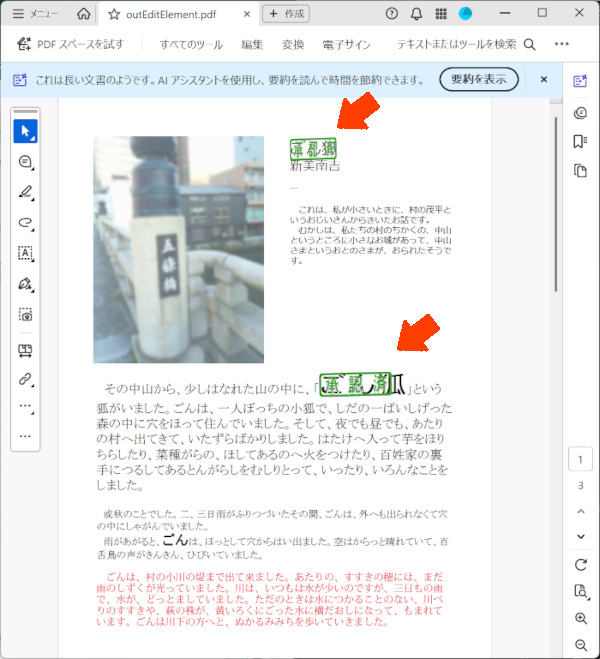
2ページ目は指定したテキストの位置にエレメントの情報を記入した注釈が追加されています。
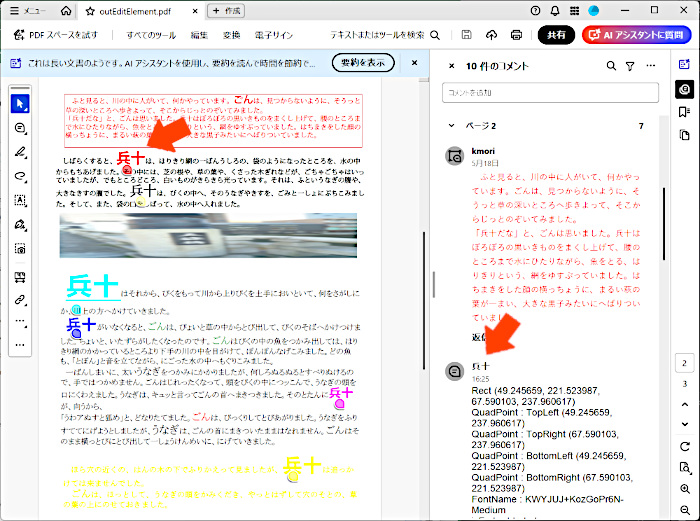
3ページ目は指定したテキストの位置へのブックマークが追加されています。