/*
	Antenna House PDF Tool API V8.0
	C++ Interface sample program

	概要:ページサイズに合わせて折り返す文字列(新規のページを作成)

	Copyright 2025- Antenna House, Inc.
*/

#include < PdfTk.h >

using namespace std;
using namespace PdfTk;

int main(int argc, char* argv[])
{
	if (argc != 2)
	{
		printf("usage: DrawTextBox_4.exe out-pdf-file \n");
		return 1;
	}

	try {
		PtlParamOutput output(argv[1]);
		PtlPDFDocument doc;

		PtlOption option;
		option.setUnit(PtlOption::UNIT_PT);

		PtlParamString fontname = "メイリオ";
		float fontSize = 24.0f;

		PtlParamFont fontNormal(fontname, fontSize, false, false, true);
		PtlColorDeviceRGB colorBlack = PtlColorDeviceRGB(0.0f, 0.0f, 0.0f);
		PtlPages& pages = doc.getPages();
		PtlPage newpage;
		PtlSize pageSize = newpage.getSize();

		pages.append(newpage, PtlPages::INSERT_OPTION::OPTION_NONE);

		PtlContent& content = newpage.getContent();
		// TextBoxを書き込む領域矩形
		PtlRect rect(0, 0, pageSize.getWidth(), pageSize.getHeight());

		// rectにページと同じサイズのTextBoxを左上に書く
		PtlTextBox& textBox = content.drawTextBox(rect, PtlContent::ALIGN_TOP_LEFT, pageSize.getWidth(), pageSize.getHeight());
		PtlParamWriteStringTextBox paramWriteString;
		paramWriteString.setFont(fontNormal);
		paramWriteString.setTextColor(colorBlack);

		const char*  text1("そのあくる日もごんは、栗をもって、兵十の家へ出かけました。兵十は物置で縄《なわ》をなっていました。それでごんは家の裏口から、こっそり中へはいりました。そのとき兵十は、ふと顔をあげました。と狐が家の中へはいったではありませんか。こないだうなぎをぬすみやがったあのごん狐めが、またいたずらをしに来たな。「ようし。」兵十は立ちあがって、納屋《なや》にかけてある火縄銃《ひなわじゅう》をとって、火薬をつめました。そして足音をしのばせてちかよって、今戸口を出ようとするごんを、ドンと、うちました。ごんは、ばたりとたおれました。兵十はかけよって来ました。家の中を見ると、土間《どま》に栗が、かためておいてあるのが目につきました。「おや」と兵十は、びっくりしてごんに目を落しました。「ごん、お前だったのか。いつも栗をくれたのは」ごんは、ぐったりと目をつぶったまま、うなずきました。兵十は火縄銃をばたりと、とり落しました。青い煙が、まだ筒口から細く出ていました。(新美南吉「ごん狐」)");
		textBox.writeStringNL(PtlParamString(text1), paramWriteString);

		textBox.terminate();

		doc.save(output);
		printf("-- 完了 --\n");

	} catch (PtlException e) {
		fprintf(stderr, "Error code : %d\n %s\n", e.getErrorCode(), e.getErrorMessage().c_str());

	} catch (...) {
		printf("Exception\n");
	}
}


PDF Tool APIサンプルコード:ページサイズに合わせて折り返す文字列(新規のページを作成)
新規のPDFを作成し、ページサイズに合わせて折り返す文字列を追加します。
概要
サンプルコードの概要
ページサイズを取得し、同サイズのテキストボックスを作製します。
そのテキストボックスに文字列を追加します。
- PtlPage.getSize(): ページサイズを取得
- PtlSize: サイズ(幅、高さ)を表現したクラス
- PtlSize.getWidth(): 幅を取得
- PtlSize.getHeight(): 高さを取得
- PtlTextBox: ページに描画されるテキストボックスを表現するクラス
- PtlContent.drawTextBox(): テキストボックスを描画
- PtlParamWriteStringTextBox: TextBoxに使うパラメータクラス
- TextBox.writeStringNL(): 文字列を出力して改行
サンプルコード
/*
	Antenna House PDF Tool API V8.0
	Java Interface sample program

	概要:ページサイズに合わせて折り返す文字列(新規のページを作成)

	Copyright 2025- Antenna House,Inc.
*/

package Sample;

import jp.co.antenna.ptl.*;

public class DrawTextBox_4 {

    /**
     * @param args the command line arguments
     */
    public static void main(String[] args) {
        if (args.length < 1)
        {
            System.out.println("usage: java DrawTextBox_4 out-pdf-file");
            return;
        }

        try (PtlParamOutput outputFile = new PtlParamOutput(args[0]);
             PtlPDFDocument doc = new PtlPDFDocument();
             PtlOption option = new PtlOption())
        {
            option.setUnit(PtlOption.UNIT.UNIT_PT);

            String fontName = "メイリオ";
            float fontSize = 24.0f;

            try (PtlParamFont fontNormal = new PtlParamFont(fontName, fontSize, false, false, true);
                PtlColorDeviceRGB colorBlack = new PtlColorDeviceRGB(0.0f, 0.0f, 0.0f);
        		PtlPages pages = doc.getPages();
        		PtlPage newpage = new PtlPage();
                PtlSize pageSize = newpage.getSize();)
            {
            	pages.append(newpage, PtlPages.OPTION_NONE);  // 新規ページの追加

                try (PtlContent content = newpage.getContent();
            		PtlRect rect = new PtlRect(0, 0, pageSize.getWidth(), pageSize.getHeight());
                    PtlTextBox textBox = content.drawTextBox(rect, PtlContent.ALIGN.ALIGN_TOP_LEFT, pageSize.getWidth(), pageSize.getHeight());
            		PtlParamWriteStringTextBox paramWriteString = new PtlParamWriteStringTextBox();)
                {
                    paramWriteString.setFont(fontNormal);
                    paramWriteString.setTextColor(colorBlack);

                    String text1 = "そのあくる日もごんは、栗をもって、兵十の家へ出かけました。兵十は物置で縄《なわ》をなっていました。それでごんは家の裏口から、こっそり中へはいりました。そのとき兵十は、ふと顔をあげました。と狐が家の中へはいったではありませんか。こないだうなぎをぬすみやがったあのごん狐めが、またいたずらをしに来たな。「ようし。」兵十は立ちあがって、納屋《なや》にかけてある火縄銃《ひなわじゅう》をとって、火薬をつめました。そして足音をしのばせてちかよって、今戸口を出ようとするごんを、ドンと、うちました。ごんは、ばたりとたおれました。兵十はかけよって来ました。家の中を見ると、土間《どま》に栗が、かためておいてあるのが目につきました。「おや」と兵十は、びっくりしてごんに目を落しました。「ごん、お前だったのか。いつも栗をくれたのは」ごんは、ぐったりと目をつぶったまま、うなずきました。兵十は火縄銃をばたりと、とり落しました。青い煙が、まだ筒口から細く出ていました。(新美南吉「ごん狐」)";
                    textBox.writeStringNL(text1, paramWriteString);     // 文字列を出力して改行
                    textBox.terminate();

                }
                doc.save(outputFile);
            }
        }
        catch (PtlException pex) {
            System.out.println("PtlException : ErrorCode = " + pex.getErrorCode() + "\n  " + pex.getErrorMessage());
        }
        catch (Exception ex) {
            System.out.println(ex.getMessage());
            ex.printStackTrace();
        }
        catch (Error ex) {
            System.out.println(ex.getMessage());
            ex.printStackTrace();
        }
        finally {
            System.out.println("-- 完了 --");
        }
	}
}
/*
	Antenna House PDF Tool API V8.0
	.NET Interface sample program

	概要:ページサイズに合わせて折り返す文字列(新規のページを作成)

	Copyright 2025- Antenna House,Inc.
*/

using System;

using PdfTkNet;

namespace DrawTextBox
{
    class DrawTextBox
    {
        static void Main(string[] args)
        {
            if (args.Length != 1)
            {
                Console.WriteLine("usage: drawTextBox.exe out-pdf-file\n");
                return;
            }

            try
            {
                using (PtlParamOutput output = new PtlParamOutput(args[0]))
                using (PtlPDFDocument doc = new PtlPDFDocument())
                using (PtlOption option = new PtlOption())
                {
                    option.setUnit(PtlOption.UNIT.UNIT_PT);

                    string fontName = "メイリオ";
                    float fontSize = 24.0f;

                    using (PtlParamFont fontNormal = new PtlParamFont(fontName, fontSize, false, false, true))
                    using (PtlColorDeviceRGB colorBlack = new PtlColorDeviceRGB(0.0f, 0.0f, 0.0f))
                    using (PtlPages pages = doc.getPages())
                    using (PtlPage newpage = new PtlPage())
                    using (PtlSize pageSize = newpage.getSize())
                    {
                        pages.append(newpage, PtlPages.INSERT_OPTION.OPTION_NONE);  // 新規ページの追加

                        using (PtlContent content = newpage.getContent())
                        using (PtlRect rect = new PtlRect(0, 0, pageSize.getWidth(), pageSize.getHeight()))
                        using (PtlTextBox textBox = content.drawTextBox(rect, PtlContent.ALIGN.ALIGN_TOP_LEFT, pageSize.getWidth(), pageSize.getHeight()))
                        using (PtlParamWriteStringTextBox paramWriteString = new PtlParamWriteStringTextBox())
                        {
                            paramWriteString.setFont(fontNormal);
                            paramWriteString.setTextColor(colorBlack);

                            string text1 = "そのあくる日もごんは、栗をもって、兵十の家へ出かけました。兵十は物置で縄《なわ》をなっていました。それでごんは家の裏口から、こっそり中へはいりました。そのとき兵十は、ふと顔をあげました。と狐が家の中へはいったではありませんか。こないだうなぎをぬすみやがったあのごん狐めが、またいたずらをしに来たな。「ようし。」兵十は立ちあがって、納屋《なや》にかけてある火縄銃《ひなわじゅう》をとって、火薬をつめました。そして足音をしのばせてちかよって、今戸口を出ようとするごんを、ドンと、うちました。ごんは、ばたりとたおれました。兵十はかけよって来ました。家の中を見ると、土間《どま》に栗が、かためておいてあるのが目につきました。「おや」と兵十は、びっくりしてごんに目を落しました。「ごん、お前だったのか。いつも栗をくれたのは」ごんは、ぐったりと目をつぶったまま、うなずきました。兵十は火縄銃をばたりと、とり落しました。青い煙が、まだ筒口から細く出ていました。(新美南吉「ごん狐」)";
                            textBox.writeStringNL(text1, paramWriteString);     // 文字列を出力して改行
                            textBox.terminate();
                        }
                        doc.save(output);
                        Console.WriteLine("-- 完了 --");
                    }
                }
            }
            catch (PtlException pex)
            {
                Console.WriteLine(pex.getErrorCode() + " : " + pex.getErrorMessageJP());
                pex.Dispose();
            }
            catch (Exception ex)
            {
                Console.WriteLine(ex.Message);
            }
        }
	}
}
実行例
コマンドラインでの実行例
DrawTextBox_4.exe C:\sav\outDrawTextBox_4.pdf
-- 完了 --
java -jar DrawTextBox_4.jar C:\sav\outDrawTextBox_4.pdf
-- 完了 --
DrawTextBox_4.exe C:\sav\outDrawTextBox_4.pdf
-- 完了 --
出力結果イメージ
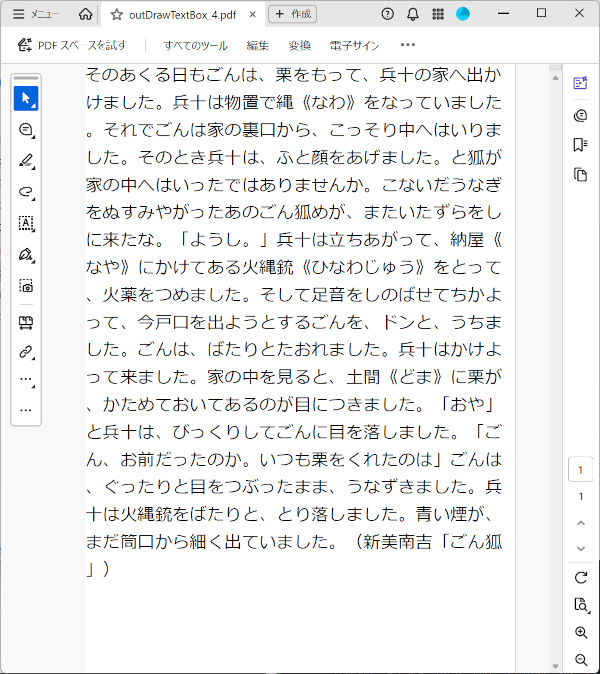
ページサイズに合わせて折り返す文字列が表示されます。