/*
	Antenna House PDF Tool API V8.0
	C++ Interface sample program

	概要:矩形内で折り返す文字列

	Copyright 2025- Antenna House, Inc.
*/

#include < PdfTk.h >

using namespace std;
using namespace PdfTk;

int main(int argc, char* argv[])
{
	if (argc != 3)
	{
		printf("usage: DrawTextBox_3.exe in-pdf-file out-pdf-file \n");
		return 1;
	}

	try {
		PtlParamInput input(argv[1]);
		PtlParamOutput output(argv[2]);
		PtlPDFDocument doc;
		doc.load(input);

		PtlOption option;
		option.setUnit(PtlOption::UNIT_PT);

		PtlParamString fontname = "メイリオ";
		float fontSize = 24.0f;

		PtlParamFont fontNormal(fontname, fontSize, false, false, true);
		PtlParamFont fontBoldItalic(fontname, fontSize, true, true, true);
		PtlColorDeviceRGB colorBlack = PtlColorDeviceRGB(0.0f, 0.0f, 0.0f);
		PtlColorDeviceRGB colorRed = PtlColorDeviceRGB(1.0f, 0.0f, 0.0f);

		PtlPages& pages = doc.getPages();
		PtlPage page0 = pages.get(0);
		PtlSize pageSize = page0.getSize();
		PtlContent& content = page0.getContent();

		// TextBoxを書き込む領域矩形はページサイズより上下左右20ポイント小さいものにする
		PtlRect rect(20, 20, pageSize.getWidth()-20, pageSize.getHeight()-20);
		// rectに300×400のTextBoxを左上に書く
		PtlTextBox& textBox = content.drawTextBox(rect, PtlContent::ALIGN_TOP_LEFT, 400, 400);

		// TextBoxの縁取りを付ける
		textBox.setOutlineColor(colorRed);
		// 縁取りがテキストを囲むサイズに変わるよう指定
		textBox.fitToBBox(true);

		PtlParamWriteStringTextBox paramWriteString;
		paramWriteString.setFont(fontNormal);
		paramWriteString.setTextColor(colorBlack);

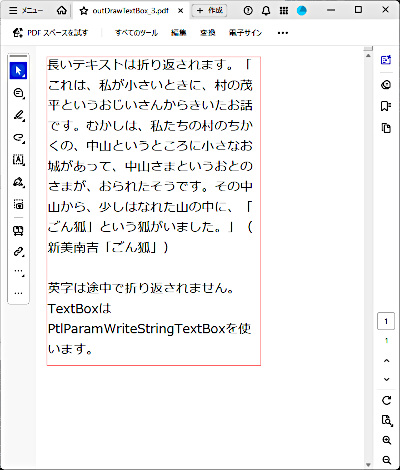
		const char* text1("長いテキストは折り返されます。");
		textBox.writeString(text1, paramWriteString);	// 文字列を出力

		const char* text2 = "「これは、私が小さいときに、村の茂平というおじいさんからきいたお話です。むかしは、私たちの村のちかくの、中山というところに小さなお城があって、中山さまというおとのさまが、おられたそうです。その中山から、少しはなれた山の中に、「ごん狐」という狐がいました。」(新美南吉「ごん狐」)";
		textBox.writeStringNL(text2, paramWriteString); // 文字列を出力して改行

		textBox.writeNL();  // 改行

		const char* text3 = ("英字は途中で折り返されません。TextBoxはPtlParamWriteStringTextBoxを使います。");
		textBox.writeStringNL(text3, paramWriteString); // 文字列を出力して改行

		textBox.terminate();

		doc.save(output);

		printf("-- 完了 --\n");

	} catch (PtlException e) {
		fprintf(stderr, "Error code : %d\n %s\n", e.getErrorCode(), e.getErrorMessage().c_str());

	} catch (...) {
		printf("Exception\n");
	}
}


PDF Tool APIサンプルコード:矩形内で折り返す文字列
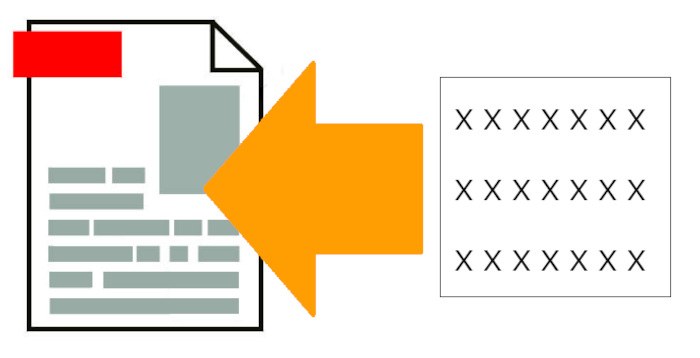
指定したPDFにテキストボックスを用いて矩形内で折り返す文字列を追加します。
概要
サンプルコードの概要
ページにテキストボックスを配置して文字列を出力します。
- PtlContent: ページに描画される内容(コンテント)を表現するクラス
- PtlContent.drawTextBox(): テキストボックスを描画します
- PtlTextBox: ページに描画されるテキストボックスを表現するクラス
- PtlParamWriteStringTextBox: TextBoxに使うパラメータクラス
- PtlTextBox.writeString(): 文字列を出力します
- PtlTextBox.writeStringNL(): 文字列を出力して改行します
サンプルコード
/*
	Antenna House PDF Tool API V8.0
	Java Interface sample program

	概要:矩形内で折り返す文字列

	Copyright 2025- Antenna House,Inc.
*/

package Sample;

import jp.co.antenna.ptl.*;

public class DrawTextBox_3 {

    /**
     * @param args the command line arguments
     */
    public static void main(String[] args) {
        if (args.length < 2)
        {
            System.out.println("usage: java DrawTextBox_3 in-pdf-file out-pdf-file");
            return;
        }

        try (PtlParamInput inputFile = new PtlParamInput(args[0]);
             PtlParamOutput outputFile = new PtlParamOutput(args[1]);
             PtlPDFDocument doc = new PtlPDFDocument();
             PtlOption option = new PtlOption())
        {
            option.setUnit(PtlOption.UNIT.UNIT_PT);

            doc.load(inputFile);

            String fontName = "メイリオ";
            float fontSize = 24.0f;

            try (PtlParamFont fontNormal = new PtlParamFont(fontName, fontSize, false, false, true);
                 PtlParamFont fontBoldItalic = new PtlParamFont(fontName, fontSize, true, true, true);
                 PtlColorDeviceRGB colorBlack = new PtlColorDeviceRGB(0.0f, 0.0f, 0.0f);
                 PtlColorDeviceRGB colorRed = new PtlColorDeviceRGB(1.0f, 0.0f, 0.0f);
        		 PtlPages pages = doc.getPages();
                 PtlPage page = pages.get(0);     //1ページ目
                 PtlSize pageSize = page.getSize();
                 PtlContent content = page.getContent();
                 PtlRect rect = new PtlRect(20, 20, pageSize.getWidth() - 20, pageSize.getHeight() - 20);
                 PtlTextBox textBox = content.drawTextBox(rect, PtlContent.ALIGN.ALIGN_TOP_LEFT, 400, 400);)
            {
                // TextBoxの縁取りを付ける
                textBox.setOutlineColor(colorRed);

                // 縁取りがテキストを囲むサイズに変わるよう指定
                textBox.fitToBBox(true);

                try (PtlParamWriteStringTextBox paramWriteString = new PtlParamWriteStringTextBox();)
                {

                    paramWriteString.setFont(fontNormal);
                    paramWriteString.setTextColor(colorBlack);

                    String text1 = "長いテキストは折り返されます。";
                    textBox.writeString(text1, paramWriteString);   // 文字列を出力

                    String text2 = "「これは、私が小さいときに、村の茂平というおじいさんからきいたお話です。むかしは、私たちの村のちかくの、中山というところに小さなお城があって、中山さまというおとのさまが、おられたそうです。その中山から、少しはなれた山の中に、「ごん狐」という狐がいました。」(新美南吉「ごん狐」)";
                    textBox.writeStringNL(text2, paramWriteString); // 文字列を出力して改行

                    textBox.writeNL();  // 改行

                    String text3 = ("英字は途中で折り返されません。TextBoxはPtlParamWriteStringTextBoxを使います。");
                    textBox.writeStringNL(text3, paramWriteString); // 文字列を出力して改行

                }
                textBox.terminate();

                doc.save(outputFile);
            }
        }
        catch (PtlException pex) {
            System.out.println("PtlException : ErrorCode = " + pex.getErrorCode() + "\n  " + pex.getErrorMessage());
        }
        catch (Exception ex) {
            System.out.println(ex.getMessage());
            ex.printStackTrace();
        }
        catch (Error ex) {
            System.out.println(ex.getMessage());
            ex.printStackTrace();
        }
        finally {
            System.out.println("-- 完了 --");
        }
	}
}
/*
	Antenna House PDF Tool API V8.0
	.NET Interface sample program

	概要:矩形内で折り返す文字列

	Copyright 2021-2025 Antenna House,Inc.
*/

using System;

using PdfTkNet;

namespace DrawTextBox
{
    class DrawTextBox
    {
        static void Main(string[] args)
        {
            if (args.Length != 2)
            {
                Console.WriteLine("usage: DrawTextBox_3.exe in-pdf-file out-pdf-file\n");
                return;
            }

            try
            {
                using (PtlParamInput input = new PtlParamInput(args[0]))
                using (PtlParamOutput output = new PtlParamOutput(args[1]))
                using (PtlPDFDocument doc = new PtlPDFDocument())
                using (PtlOption option = new PtlOption())
                {
                    option.setUnit(PtlOption.UNIT.UNIT_PT);

                    doc.load(input);

                    string fontName = "メイリオ";
                    float fontSize = 24.0f;

                    using (PtlParamFont fontNormal = new PtlParamFont(fontName, fontSize, false, false, true))
                    using (PtlParamFont fontBoldItalic = new PtlParamFont(fontName, fontSize, true, true, true))
                    using (PtlColorDeviceRGB colorBlack = new PtlColorDeviceRGB(0.0f, 0.0f, 0.0f))
                    using (PtlColorDeviceRGB colorRed = new PtlColorDeviceRGB(1.0f, 0.0f, 0.0f))
                    {
                        using (PtlPages pages = doc.getPages())
                        using (PtlPage page = pages.get(0))     //1ページ目
                        using (PtlSize pageSize = page.getSize())
                        using (PtlContent content = page.getContent())
                        using (PtlRect rect = new PtlRect(20, 20, pageSize.getWidth() - 20, pageSize.getHeight() - 20))
                        using (PtlTextBox textBox = content.drawTextBox(rect, PtlContent.ALIGN.ALIGN_TOP_LEFT, 400, 400))
                        {
                            // TextBoxの縁取りを付ける
                            textBox.setOutlineColor(colorRed);

                            // 縁取りがテキストを囲むサイズに変わるよう指定
                            textBox.fitToBBox(true);

                            using (PtlParamWriteStringTextBox paramWriteString = new PtlParamWriteStringTextBox())
                            {

                                paramWriteString.setFont(fontNormal);
                                paramWriteString.setTextColor(colorBlack);

                                string text1 = "長いテキストは折り返されます。";
                                textBox.writeString(text1, paramWriteString);   // 文字列を出力

                                string text2 = "「これは、私が小さいときに、村の茂平というおじいさんからきいたお話です。むかしは、私たちの村のちかくの、中山というところに小さなお城があって、中山さまというおとのさまが、おられたそうです。その中山から、少しはなれた山の中に、「ごん狐」という狐がいました。」(新美南吉「ごん狐」)";
                                textBox.writeStringNL(text2, paramWriteString); // 文字列を出力して改行

                                textBox.writeNL();  // 改行

                                string text3 = ("英字は途中で折り返されません。TextBoxはPtlParamWriteStringTextBoxを使います。");
                                textBox.writeStringNL(text3, paramWriteString); // 文字列を出力して改行
                            }
                            textBox.terminate();

                            doc.save(output);
                            Console.WriteLine("-- 完了 --");
                        }
                    }
                }
            }
            catch (PtlException pex)
            {
                Console.WriteLine(pex.getErrorCode() + " : " + pex.getErrorMessageJP());
                pex.Dispose();
            }
            catch (Exception ex)
            {
                Console.WriteLine(ex.Message);
            }
        }
	}
}
実行例
コマンドラインでの実行例
DrawTextBox_3.exe C:\in\blank.pdf C:\sav\outDrawTextBox_3.pdf
-- 完了 --
java -jar DrawTextBox_3.jar C:\in\blank.pdf C:\sav\outDrawTextBox_3.pdf
-- 完了 --
DrawTextBox_3.exe C:\in\blank.pdf C:\sav\outDrawTextBox_3.pdf
-- 完了 --
出力結果イメージ
テキストボックスにあわせて折り返す文字列が表示されます。