/*
	Antenna House PDF Tool API V7.0
	C++ Interface sample program

	概要:PDFファイルの結合

	Copyright 2013-2021 Antenna House, Inc.
*/

#include < PdfTk.h >
#include < stdio.h >

using namespace PdfTk;

int main(int argc, char* argv[])
{
	if (argc < 4) {
		printf("usage: AppendPages.exe in-pdf-file out-pdf-file append-pdf-file\n");
		return 1;
	}
	try
	{
		PtlParamInput input(argv[1]);		//元PDF
		PtlParamOutput output(argv[2]);		//出力PDF
		PtlParamInput appendfile(argv[3]);	//追加PDF

		PtlPDFDocument doc;

		// PDFファイルをロードします。
		doc.load(input);

		//ページコンテナの取得
		PtlPages& pages = doc.getPages();

		PtlPDFDocument doc_app;

		// 追加するPDFファイルをロードします。
		doc_app.load(appendfile);

		// ページの追加(1P目から全頁) OPTION_COPY_OUTLINES = 0x00000004 /* ページ挿入時にあわせてしおりをコピーします。他PDFのページ挿入時に有効となります。 */
		pages.append(doc_app, 0, PtlPages::PAGE_ALL, PtlPages::OPTION_COPY_OUTLINES);

		// 別のファイルに保存します。
		doc.save(output);

		printf("完了!\n");
	}
	catch (const PtlException &e)
	{
		fprintf(stderr, "Error code : %d\n %s\n", e.getErrorCode(), e.getErrorMessage().c_str());
		return 1;
	}
	return 0;
}


PDF Tool APIサンプルコード:PDF文書の結合
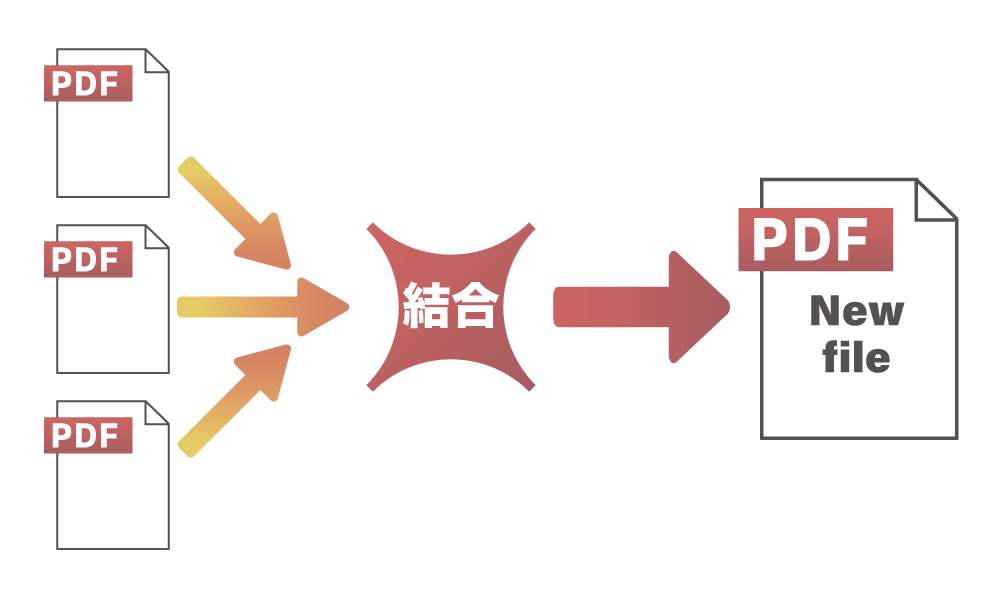
PDF文書にPDF文書のページを追加します。
概要
サンプルコードの概要
PDF文書に指定したPDF文書の指定したページ範囲を結合します
オプションの指定で注釈やフォーム、しおり、添付ファイルなども一緒に結合することを指定できます
1つ目のPDFを読み込み、getPages() でページオブジェクトのコンテナを取得します。
2つ目のPDFを読み込み、指定した範囲をappend()で1つ目のPDFに追加します。
save()で別のファイルに保存します。
- PtlPages :ページのコンテナを表現するクラス
- PtlPDFDocument.getPages() :ページコンテナの取得
- PtlPages.append() :ページの追加
- PtlPDFDocument.save() :PDF文書の保存
サンプルコード
/*
    Antenna House PDF Tool API V7.0
    Java Interface sample program

    概要:PDFファイルの結合

    Copyright 2015-2021 Antenna House, Inc.
*/

package Sample;

import jp.co.antenna.ptl.*;

public class AppendPages {

    /**
     * @param args the command line arguments
     */
    public static void main(String[] args) {
        if (args.length < 3)
        {
            System.out.println("usage: java AppendPages in-pdf-file out-pdf-file append-pdf-file");
            return;
        }

        try (PtlParamInput inputFile = new PtlParamInput(args[0]);
             PtlParamOutput outputFile = new PtlParamOutput(args[1]);
             PtlPDFDocument doc = new PtlPDFDocument())
        {
            // PDFファイルをロード
            doc.load(inputFile);

            try (PtlPages pages = doc.getPages()) //ページコンテナの取得
            {
                try (PtlParamInput appendFile = new PtlParamInput(args[2]);
                     PtlPDFDocument doc_app = new PtlPDFDocument())
                {
                    // 追加するPDFファイルをロードします。
                    doc_app.load(appendFile);

                    // ページの追加(1P目から全頁) OPTION_COPY_OUTLINES = 0x00000004 /* ページ挿入時にあわせてしおりをコピーします。他PDFのページ挿入時に有効となります。 */
                    pages.append(doc_app, 0, PtlPages.PAGE_ALL, PtlPages.OPTION_COPY_OUTLINES);
                }
            }

            // ファイルに保存します。
            doc.save(outputFile);
        }
        catch (PtlException pex) {
             System.out.println("PtlException : ErrorCode = " + pex.getErrorCode() + "\n  " + pex.getErrorMessage());
        }
        catch (Exception ex) {
            System.out.println(ex.getMessage());
            ex.printStackTrace();
        }
        catch (Error ex) {
            System.out.println(ex.getMessage());
            ex.printStackTrace();
        }
        finally {
            System.out.println("-- 完了 --");
        }
    }
}
/*
	Antenna House PDF Tool API V7.0
	.NET Interface sample program

	概要:PDFファイルの結合

	Copyright 2013-2021 Antenna House, Inc.
*/

using System;
using PdfTkNet;

namespace AppendPages
{
    class Program
    {
        static void Main(string[] args)
        {
            if (args.Length < 3)
            {
                Console.WriteLine("usage: AppendPages.exe input-pdf output-pdf append-pdf-file");
                return;
            }

            try
            {
                using (PtlParamInput inputFile = new PtlParamInput(args[0]))
                using (PtlParamOutput outputFile = new PtlParamOutput(args[1]))
                using (PtlParamInput appendfile = new PtlParamInput(args[2]))
                using (PtlPDFDocument doc = new PtlPDFDocument())
                using (PtlPDFDocument doc_app = new PtlPDFDocument())
                {
                    // PDFファイルをロードします。
                    doc.load(inputFile);

                    using (PtlPages pages = doc.getPages()) //ページコンテナの取得
                    {
                        // 追加するPDFファイルをロードします。
                        doc_app.load(appendfile);

                        // ページの追加(1P目から全頁) OPTION_COPY_OUTLINES = 0x00000004 /* ページ挿入時にあわせてしおりをコピーします。他PDFのページ挿入時に有効となります。 */
                        pages.append(doc_app, 0, (int)PtlPages.NUM_PAGES.PAGE_ALL, PtlPages.INSERT_OPTION.OPTION_COPY_OUTLINES);
                    }
                    // ファイルに保存します。
                    doc.save(outputFile);
                }
            }
            catch (PtlException pex)
            {
                Console.WriteLine(pex.getErrorCode() + " : " + pex.getErrorMessageJP());
                pex.Dispose();
            }
            catch (Exception ex)
            {
                Console.WriteLine(ex.Message);
            }
            finally
            {
                Console.WriteLine("-- 完了 --");
            }
        }
    }
}
実行例
コマンドラインでの実行例
AppendPages.exe C:\in\test.pdf C:\sav\outAppendPages.pdf C:\in\sample.pdf
完了!
java -jar AppendPages.jar C:\in\in.pdf C:\sav\outAppendPages.pdf C:\in\sample.pdf
-- 完了 --
AppendPages.exe C:\in\test.pdf C:\sav\outAppendPages.pdf C:\in\sample.pdf
-- 完了 --
出力結果イメージ
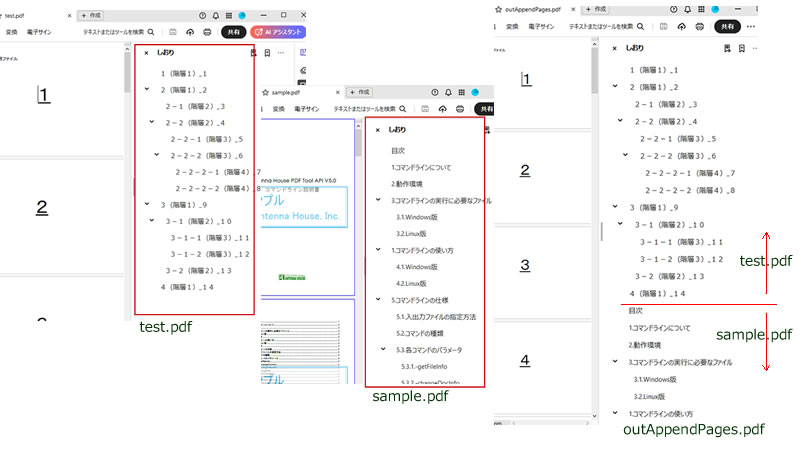
test.pdfとsample.pdfを入力して、outAppendPages.pdfを作成しています。
なお、2つの入力PDFにしおりが設定されています。
「OPTION_COPY_OUTLINES」により、出力PDFには、図のように2つのしおりを結合したしおりがつきます。